For many small and mid-sized businesses, ERP is an investment they can't avoid but are afraid to get wrong. Orders, inventory and finance are each managed separately, and reports have to be pieced together by hand. Yet the thought of a project lasting months, a budget that keeps growing and staff who resist the change makes it hard to commit. Our experience delivering projects shows that the success of an ERP project rarely depends on which software you choose; it depends far more on whether the company has prepared its requirements, processes, data and people before go-live.
So when should an SMB adopt ERP? And how should it select and implement a system to avoid costly detours? This article explains what ERP is, the typical signs that a company needs it, why projects so often run over time and budget, six dimensions to compare during selection, and a seven-step implementation method from defining requirements to post-go-live optimization, before answering a few questions companies frequently ask.
What is ERP, and when does an SMB need it?
ERP stands for Enterprise Resource Planning: software that manages core business functions such as purchasing, sales, inventory, production and finance in a single system, on a single set of data. The core value of ERP is not “one more piece of software”, but that each transaction is entered only once from the moment it happens to the moment it is posted, and every department sees the same number.
For example, once a sales order is confirmed in ERP, the warehouse can immediately see what needs to be shipped; after shipment, inventory is reduced automatically, and the invoice and accounts receivable are generated along with it. At month-end, finance no longer has to chase sales and the warehouse to find out how much was actually sold that month.
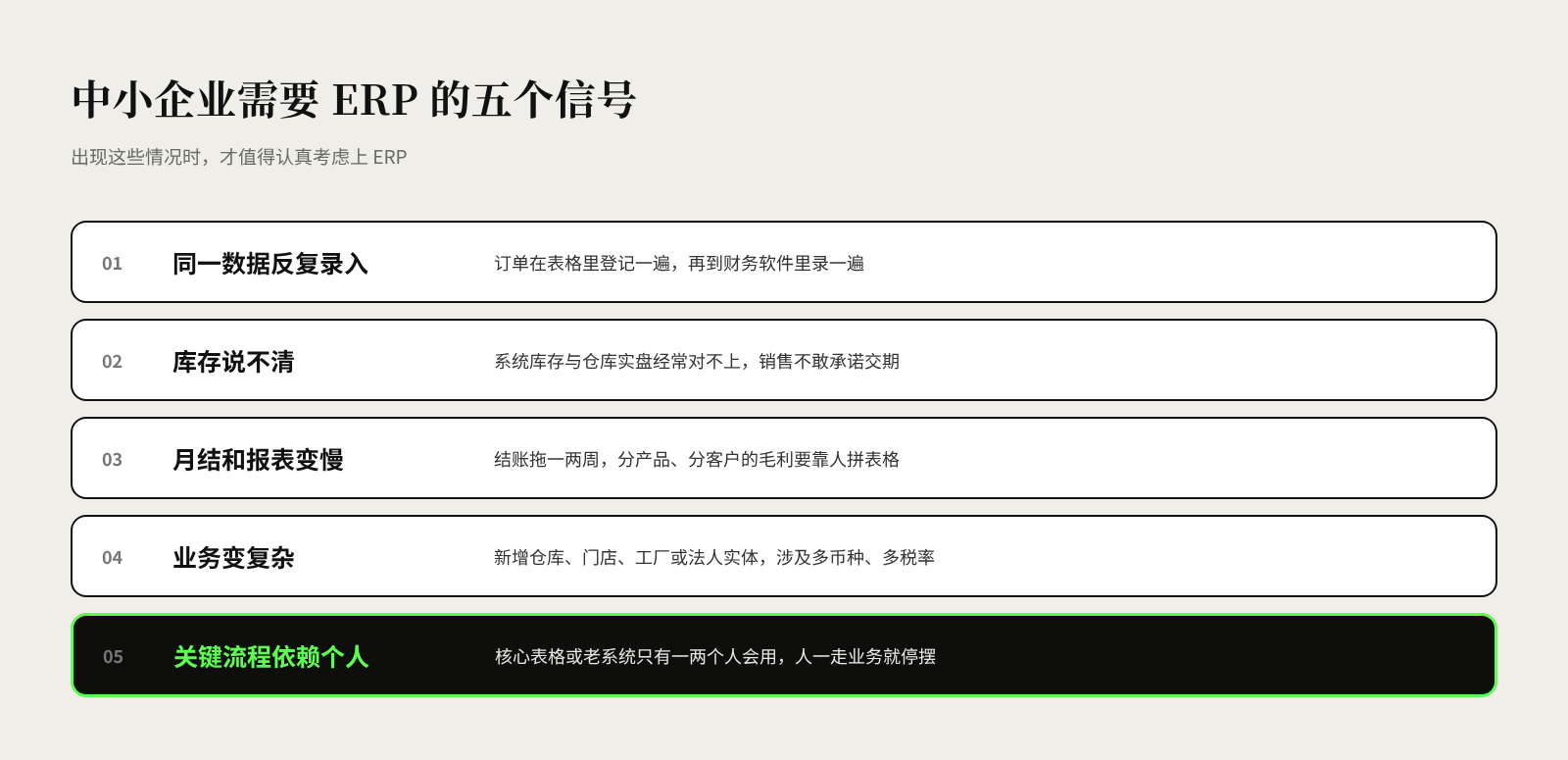
Not every company needs ERP. For very small businesses with simple operations, a single store or a single warehouse, accounting software plus an inventory and order management tool is often enough. It is worth giving ERP serious consideration when the following signs appear:
- The same data is entered repeatedly. Orders are logged in a spreadsheet and then entered again in the accounting software, and errors and reconciliation become part of daily work.
- Nobody can say what's in stock. System inventory regularly fails to match physical counts in the warehouse, sales staff don't dare commit to delivery dates, and purchasing over-orders based on gut feeling.
- Month-end close and reporting keep slowing down. Closing the books drags on for one or two weeks, and when management wants to see gross margin by product or customer, someone spends days stitching spreadsheets together.
- The business has become more complex. New warehouses, stores, factories or legal entities have been added, and multiple currencies, tax rates or cross-region transfers come into play — more than the existing tools can handle.
- Key processes depend on individuals. A core spreadsheet or legacy system can only be operated by one or two people, and if they leave, the business grinds to a halt.
In terms of size, the independent consultancy Panorama Consulting Group's “The 2026 ERP Report” groups ERP products into tiers by target customer size. One tier mainly serves SMBs with annual revenue of USD 10 million to 250 million, typically operating in a single industry with a single legal entity; smaller companies are served mainly by hundreds of small software vendors (source). In other words, there is no shortage of products on the market, and the key to selection is finding the tier that matches your size and complexity, not chasing the most features.
Why do ERP projects so often run over time and over budget?
The most common way ERP projects go wrong is not that the system fails to go live, but that it goes live and doesn't achieve the original goals. Most problems are planted during selection and preparation; they simply don't surface until late in implementation.
Several studies illustrate this from different angles:
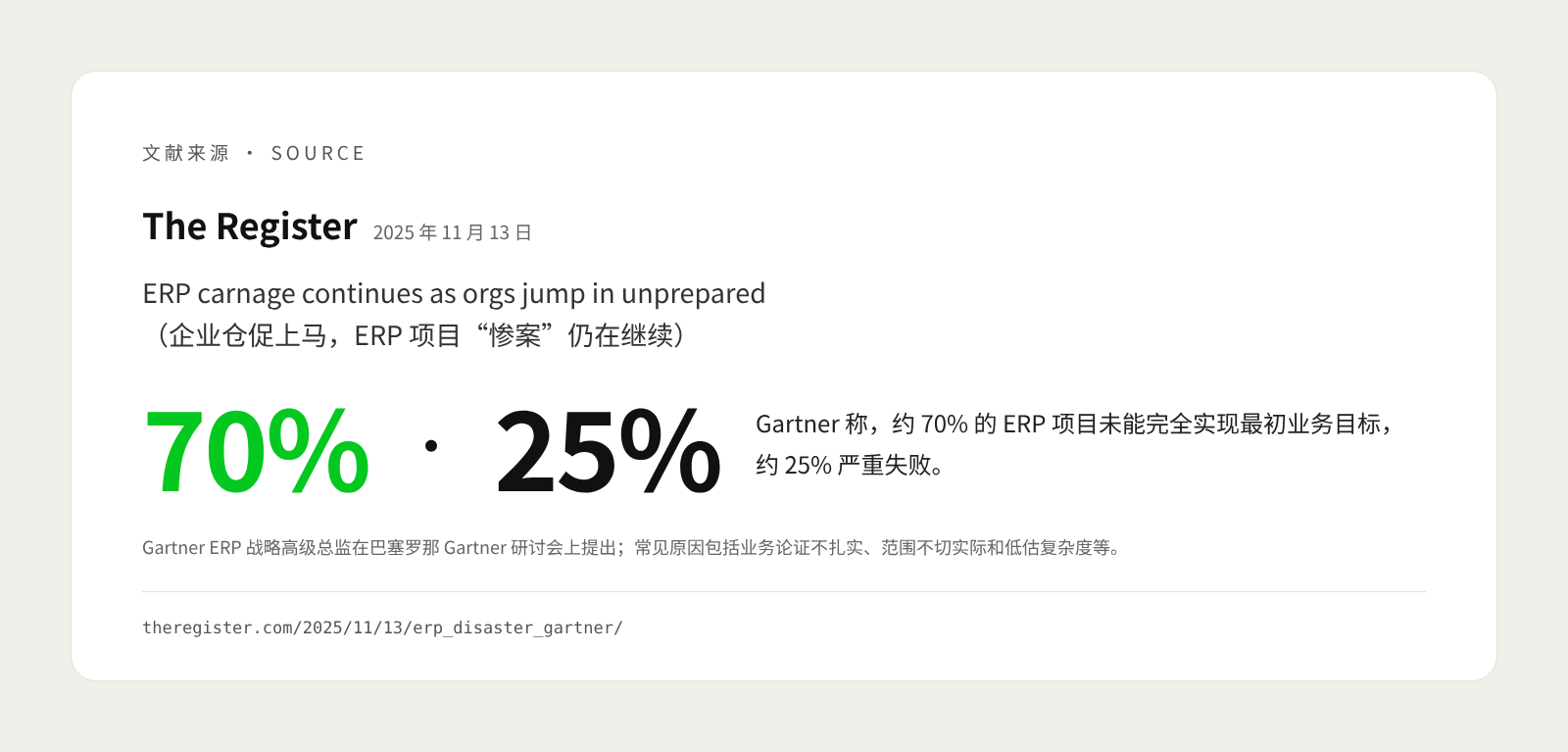
- Most projects struggle to fully meet their original goals. In its research “What IT Leaders Must Do to Avoid Disappointing ERP Initiatives”, Gartner predicts that by 2027, more than 70% of recently implemented ERP initiatives will fail to fully meet their original business goals (source). According to a November 2025 report in The Register, a Gartner senior director for ERP strategy likewise said at a Gartner symposium in Barcelona that around 70% of ERP projects fail to fully meet their original business goals and around 25% fail badly; common causes include weak business cases, unrealistic scope, underestimated complexity and scope creep (source).
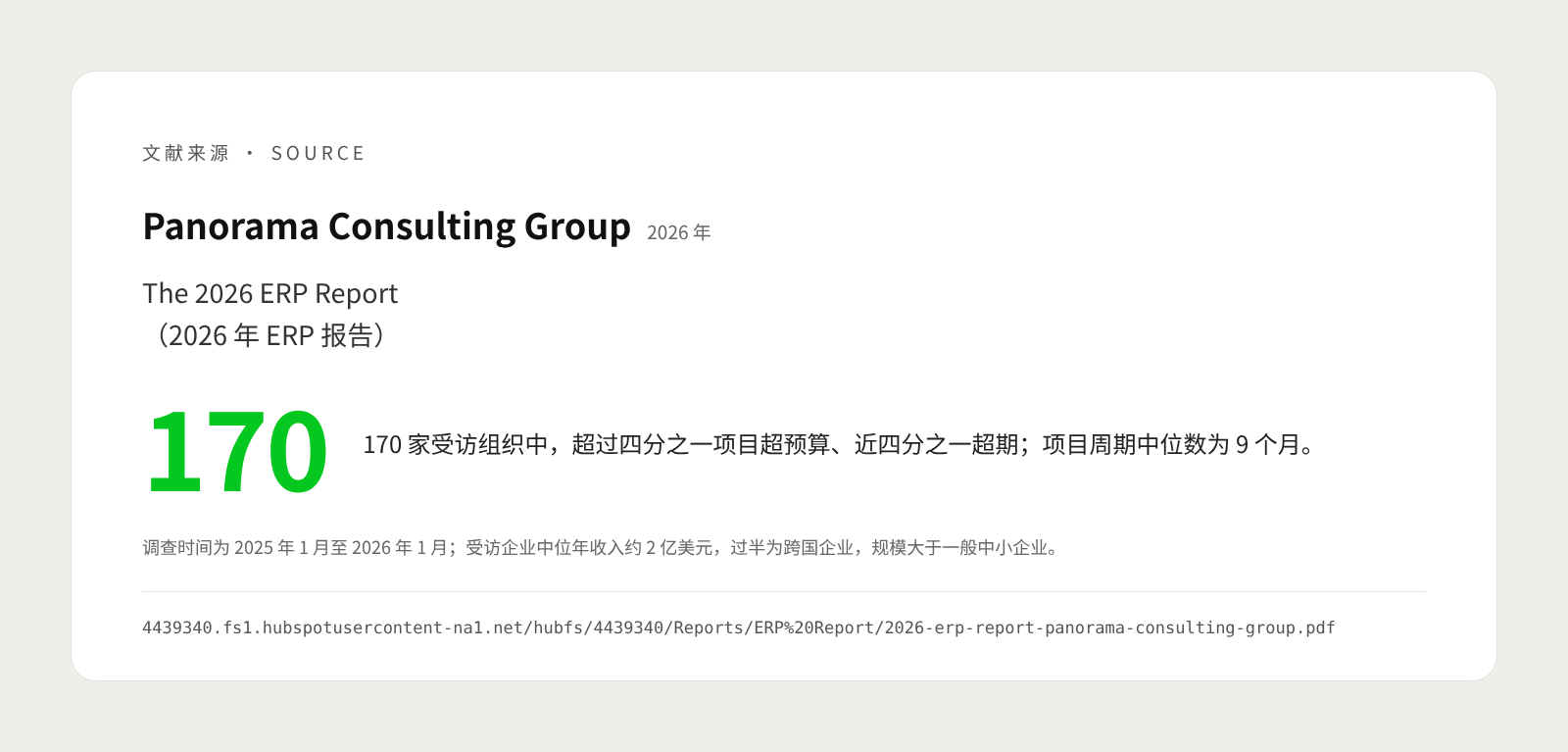
- Budget and schedule overruns are not unusual. Panorama's “The 2026 ERP Report” surveyed 170 organizations between January 2025 and January 2026. More than a quarter said their project exceeded its budget, and nearly a quarter said it ran over schedule; the median project duration was 9 months (source). Note that the respondents had median annual revenue of around USD 200 million and more than half were multinationals — considerably larger than a typical SMB — so the results should be read as indicative only.
- Cost and schedule overruns have different main causes. The same report found that the most common reason for going over budget was an unexpected need for additional technology. Panorama attributes this largely to poor selection: critical functional gaps are discovered late in the project, forcing companies to buy more software, expand the scope or commission custom development. The most common reason for schedule overruns, by contrast, was organizational — decision-making, resistance to change and process redesign — and fewer than a quarter of organizations placed a strong emphasis on organizational change management. In the previous year's “The 2025 ERP Report” (172 organizations surveyed), the most common cause of delays was data issues: insufficient data completeness, consistency and accuracy (source).
Applied to the SMB context, these findings point to three common pitfalls:
- Selecting before requirements are clear. Decisions are based on demos and quotes alone, without testing against the company's own real business. For example, a wholesaler discovers only after signing that the system doesn't support the “one order, shipped from multiple warehouses” scenario it relies on, and has to pay for additional development.
- Treating ERP as an IT project. Business leaders stay out of process design, key decisions drag on, the system is configured around old habits, and after go-live staff drift back to spreadsheets.
- Underestimating data preparation. Customer, item and supplier records are riddled with duplicates and errors, opening inventory and receivables balances don't reconcile, and the go-live date slips again and again.
What should you compare when selecting an ERP system?
Selection is not about whose feature list is longer, but about which option best fits your business, budget and team capabilities. The most reliable approach is to write down your key business scenarios first, then ask each candidate to demonstrate against them.
The table below sets out the six dimensions most worth comparing for SMBs:
| Dimension | Questions to answer | Points to watch |
|---|---|---|
| Deployment model | Cloud subscription (SaaS), on-premises, or hosted in a private cloud? | Cloud means lower upfront investment and no maintenance, but you have to adapt to the vendor's upgrade cycle; on-premises gives more control, but servers, backups and upgrades are all your responsibility |
| Standard vs. custom | How many key processes do standard features cover? What must be customized? | The more customization, the slower the implementation and the harder future upgrades; adjust processes first, use configuration second, and consider development only as a last resort |
| Industry fit | Does it support your industry's key operations, such as batches and shelf life, formulas, multiple stores or project accounting? | Ask candidates for customer references in the same industry and of a similar size, and visit or speak with them where possible |
| Total cost of ownership | What is the total spend over the next 3–5 years? | Beyond software fees, include implementation services, data migration, systems integration, training, internal staff time and ongoing support |
| Implementation partner | Who will implement it? Do the consultants know your industry? Who provides support after go-live? | The implementation team's experience often affects the outcome more than the software itself; confirm the core consultants and the support model before signing |
| Integration and extensibility | Can it connect to e-commerce platforms, warehouse systems, POS systems, banks and so on? | Confirm the integration method, costs and maintenance responsibilities, to avoid new development every time you add a system |
The weighting of each dimension should reflect your company's situation. A multi-store retailer, for example, should give more weight to POS integration, while a discrete manufacturer should focus more on production planning and bill of materials functionality.
On deployment, one trend is worth noting. In “The 2026 ERP Report”, Panorama observes that a growing number of ERP vendors are gradually phasing out support for on-premises versions. It also cautions that cloud SaaS systems are updated frequently, so after go-live it must be clear who is responsible for user permissions, reporting standards and change requests — otherwise fragmented “shadow reports” soon start to appear (source).
Products on the market fall broadly into a few categories: general-purpose suites serving multiple industries, industry-specific ERP, open-source ERP that you can extend yourself, and integrated accounting and inventory software for very small businesses. No category is inherently better; what matters is how well it matches the company's current size, process complexity and in-house IT capabilities.
How do you implement ERP step by step? A step-by-step guide
The safest way to implement ERP is to work through goals, processes, data, go-live and optimization in that order, with clear deliverables and an owner for each step. Get the business clear first, then let the system support it — never the other way round.
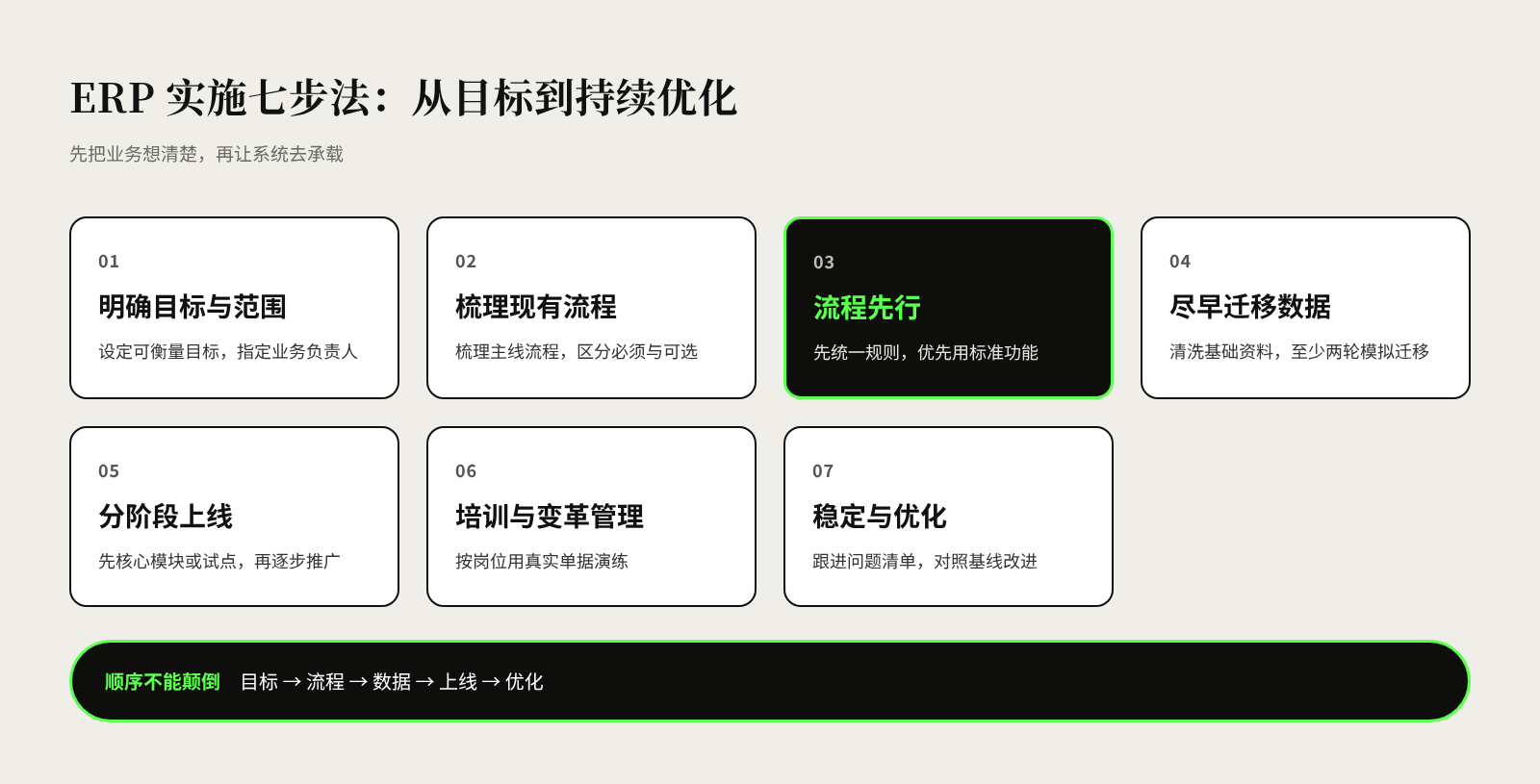
Step 1: Define goals, scope and ownership. Use a few measurable goals to explain why you are adopting ERP, such as “cut month-end close from 10 days to 5” or “reach 98% inventory accuracy”, and record your current baseline. At the same time, set out clearly what is in scope for this phase and what is excluded for now, and appoint a business leader with decision-making authority to lead the project, rather than leaving it to IT alone.
Step 2: Map current processes and requirements. Along core flows such as order-to-cash, procure-to-pay, inventory management and month-end close, map out how work is done today, the documents involved and the pain points. Split requirements into “must-haves” and “nice-to-haves”: use the former to screen options, and leave the latter for later phases.
Step 3: Put processes first and design the future way of working. Before configuring the system, standardize processes and rules, such as item coding conventions, approval authorities and pricing policies. Where standard functionality can do the job, adapt your processes to the system first; consider customization only for steps that genuinely reflect a competitive advantage.
Step 4: Start data migration early. Data migration should begin alongside process design, not a month before go-live. Focus on master data such as customers, suppliers and items, as well as opening inventory, open orders, and receivables and payables balances. Plan at least two rounds of trial migration, with the business teams checking the figures in each round to confirm the books reconcile.
Step 5: Go live in phases. SMBs can start with core modules such as finance, purchasing, sales and inventory, or pilot in one warehouse or one store first and roll out more widely once things are stable. Panorama's survey shows that more than a quarter of organizations took a “hybrid” approach: switching over core modules or a pilot unit all at once, then rolling out progressively by location or business unit (source). Before go-live, prepare a cutover checklist and a contingency plan, and schedule the switchover for a relatively quiet business period.
Step 6: Train by role and manage change. Training should be organized by job role and use the real documents employees handle every day, rather than just walking through menus. Develop one or two “key users” in each department to answer questions and collect issues. At the same time, explain clearly to employees why the change is happening and how it will affect their work.
Step 7: Stabilize after go-live and keep optimizing. The first few weeks after go-live are when issues cluster, so assign someone to follow up on the issue list daily, and compare regularly against the baseline from Step 1. Once the system is stable, plan second-phase work such as reporting and analytics, mobile approvals and integration with other systems.
After go-live, how do you know whether ERP is really delivering?
Judging whether ERP has succeeded is not just about whether it went live on time; it is about whether business metrics have improved and whether employees are actually working in the system. Go-live is only the starting point; most of the value emerges gradually once the system is running smoothly.
You can track progress on three levels:
- Usage. Is all business being done in the system, and how much data is still circulating in spreadsheets outside it? The more spreadsheets there are, the more unresolved issues remain in the processes or the system.
- Operational metrics. Have month-end close days, inventory accuracy, order processing time and report turnaround reached the goals set in Step 1?
- Management decisions. Can management see reliable business data directly in the system, without anyone having to compile it by hand?
Panorama's data supports this. Among respondents with at least one phase live for a year or more, productivity and efficiency gains were the benefits most often realized as expected, while benefits tied to changing the business model were the hardest to achieve. The share of organizations realizing benefits such as “breaking down departmental silos” rose from 55.2% the previous year to 77.4%; Panorama suggests that such benefits tend to appear only once master data management, reporting standards and decision-making accountability have stabilized (source).
For example, one distributor cut its month-end close time noticeably within the first quarter after going live with ERP; but it was only six months later, after customer tiers and pricing rules had been standardized, that management really began using system data to adjust its product mix. Giving results time to emerge while tracking metrics consistently matters more than “success” on go-live day.
Frequently asked questions about ERP selection and implementation
How long does ERP implementation usually take for an SMB? It depends on the number of modules, the degree of customization and the state of data preparation. The median project duration in Panorama's survey was 9 months, but the respondents skewed large; SMB projects with a clear scope that rely mainly on standard functionality can usually be shorter. Rather than aiming for the shortest timeline, make sure scope and data preparation are in place first.
Does it have to be cloud ERP? Not necessarily. Cloud suits companies without an IT team that want to get started quickly; companies with strict requirements on where data is stored, or with many specialized functions, can evaluate on-premises or private cloud deployment. Whichever you choose, work out the total cost of ownership over 3–5 years.
Does all historical data from the old system need to be migrated? Usually not. Typically only master data, opening balances and open documents are migrated; historical detail can stay in the old system or an archive for reference. The more you migrate, the greater the cleansing and reconciliation workload.
Can we customize as we go live? Minor adjustments are fine, but continually adding customization requests during implementation is not advisable. New requirements should be logged first, assessed for value and moved into a second phase; otherwise scope creep sets in easily and delays go-live.
References
- The 2026 ERP Report, Panorama Consulting Group, 2026
- The 2025 ERP Report, Panorama Consulting Group, 2025
- What IT Leaders Must Do to Avoid Disappointing ERP Initiatives, Gartner, no publication date given (accessed November 2026)
- ERP carnage continues as orgs jump in unprepared, The Register, November 2025