Many companies run into the same problem after trying out general-purpose large language models: they can write emails and produce summaries, but ask about the company's own expense policy, the warranty terms for a particular model or the payment conditions in a specific customer contract, and they either cannot answer or invent a response that sounds entirely plausible. The reason is simple: this information was never part of the model's training data. Getting AI to truly understand your internal documents is not a matter of switching to a more powerful model; the key is making it find the right material before it answers, and state clearly where the answer comes from.
This is precisely the problem retrieval-augmented generation (RAG) is designed to solve. This article explains why general-purpose models don't know your company, how RAG works, how it differs from fine-tuning and long context, and the common reasons enterprise knowledge bases underperform, and offers a step-by-step build guide along with answers to frequently asked questions.
Why don't general-purpose models know your company, and why do they “make things up with a straight face”?
A general-purpose model's knowledge comes from the public data used to train it, and it stops at the moment training is complete. It has never seen your internal policies, product manuals or customer contracts, yet when asked, it will often still give an answer.
This kind of “confident wrong answer” is called a hallucination. In its September 2025 research article “Why language models hallucinate,” OpenAI defines hallucinations as “plausible but false statements” generated by language models, and identifies one important cause: common training and evaluation methods look only at accuracy, so a lucky guess scores points while answering “I don't know” scores zero. Models are therefore trained to favor guessing over acknowledging uncertainty (source). The article also notes that patterned knowledge such as spelling and grammar becomes more reliable as models scale, but low-frequency facts with no discernible pattern, such as a person's birthday, cannot be inferred from patterns. A company's internal policy clauses, pricing rules and customer agreements fall squarely into this category.
For example, if an employee asks, “What is the nightly cap for hotel expenses on business trips?”, a general-purpose model may offer a plausible-sounding amount based on common practice. If that amount doesn't match company policy and the employee claims expenses accordingly, the consequences are more troublesome than no answer at all.
In short, general-purpose models have three inherent gaps in an enterprise setting:
- No access to internal information. The company's policies, product documentation, ticket records and contracts are not in any public training data.
- Knowledge has a cutoff date. After a price list changes or a policy is updated, the model doesn't know and may still answer based on the old situation.
- No clear basis for answers. Answers come without sources, so employees cannot verify them and managers cannot judge whether to trust them.
What is retrieval-augmented generation (RAG), and how does it work?
The idea behind RAG (Retrieval-Augmented Generation) can be summed up as “look it up first, then answer.” The model doesn't need to “memorize” company information; it only needs to find the relevant passages before answering and base its answer on them.
The concept comes from a 2020 paper. Patrick Lewis and fellow researchers from Facebook AI Research, University College London and New York University introduced RAG in “Retrieval-Augmented Generation for Knowledge-Intensive NLP Tasks,” published at NeurIPS 2020. They called the knowledge stored in a model's parameters “parametric memory” and an external document store that can be queried at any time (Wikipedia, in their experiments) “non-parametric memory,” noting that with the former alone, a model struggles to show where its answers come from and to update its knowledge (source). These are exactly the two things companies care about most.
In non-technical terms, an enterprise knowledge base Q&A system usually involves four steps:
- Chunking. Policy documents, product manuals, contracts and so on are split into shorter segments (chunks), and each chunk is indexed so it can later be found by its content.
- Retrieval. When an employee asks a question, the system first finds the few chunks in the index most relevant to it. A common approach combines “search by meaning” (vector search) with “search by keyword.” Anthropic notes that keyword search is especially useful for strings that must match exactly, such as product model numbers and error codes (source).
- Answering from the material. The system passes the retrieved chunks to the model along with the question and instructs it to answer only from that material; if the answer isn't there, it should say plainly “no relevant policy found.”
- Citing sources. Answers include the source document, section or page number, so employees can open the original with one click and check.
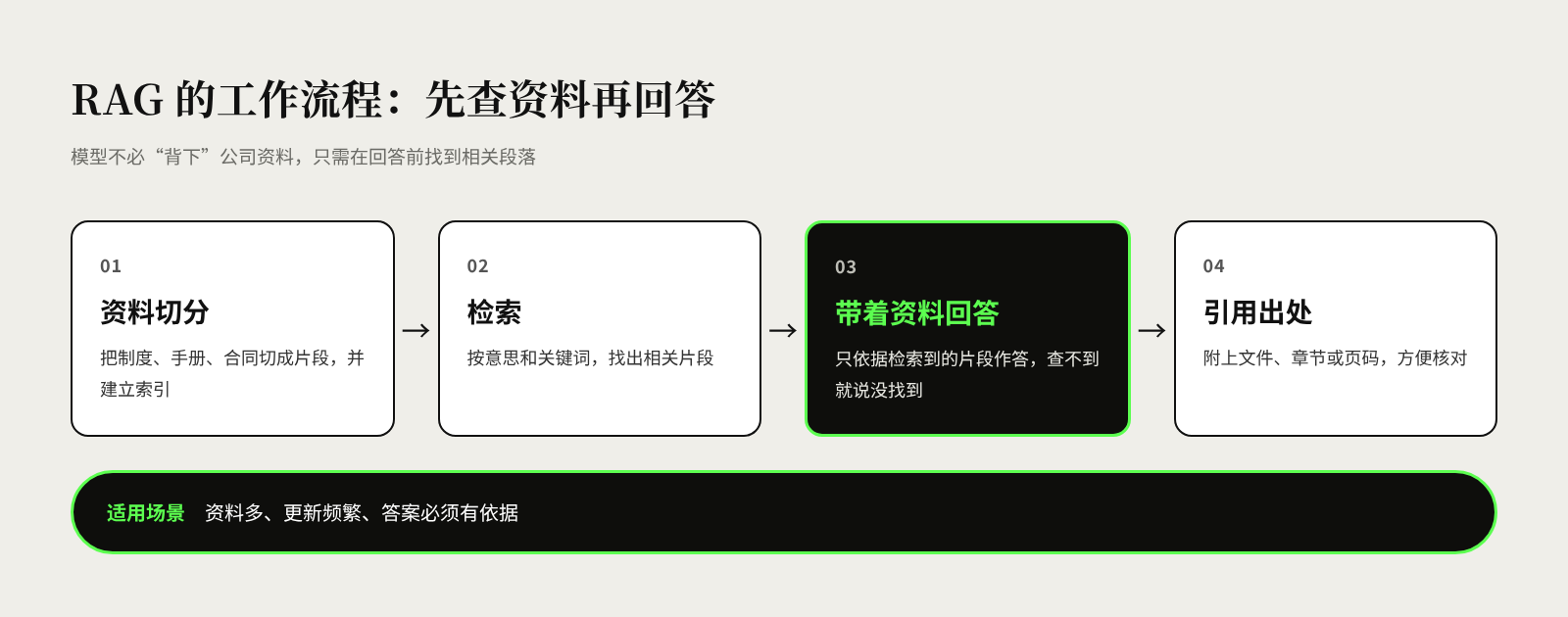
For example, when a customer service agent asks, “How many years is the motor warranty on a given product model?”, the system first finds the relevant clauses in the product manual and warranty policy, then generates an answer noting which clause of the Warranty Policy it comes from. The agent can explain the basis to the customer without trawling through the shared drive.
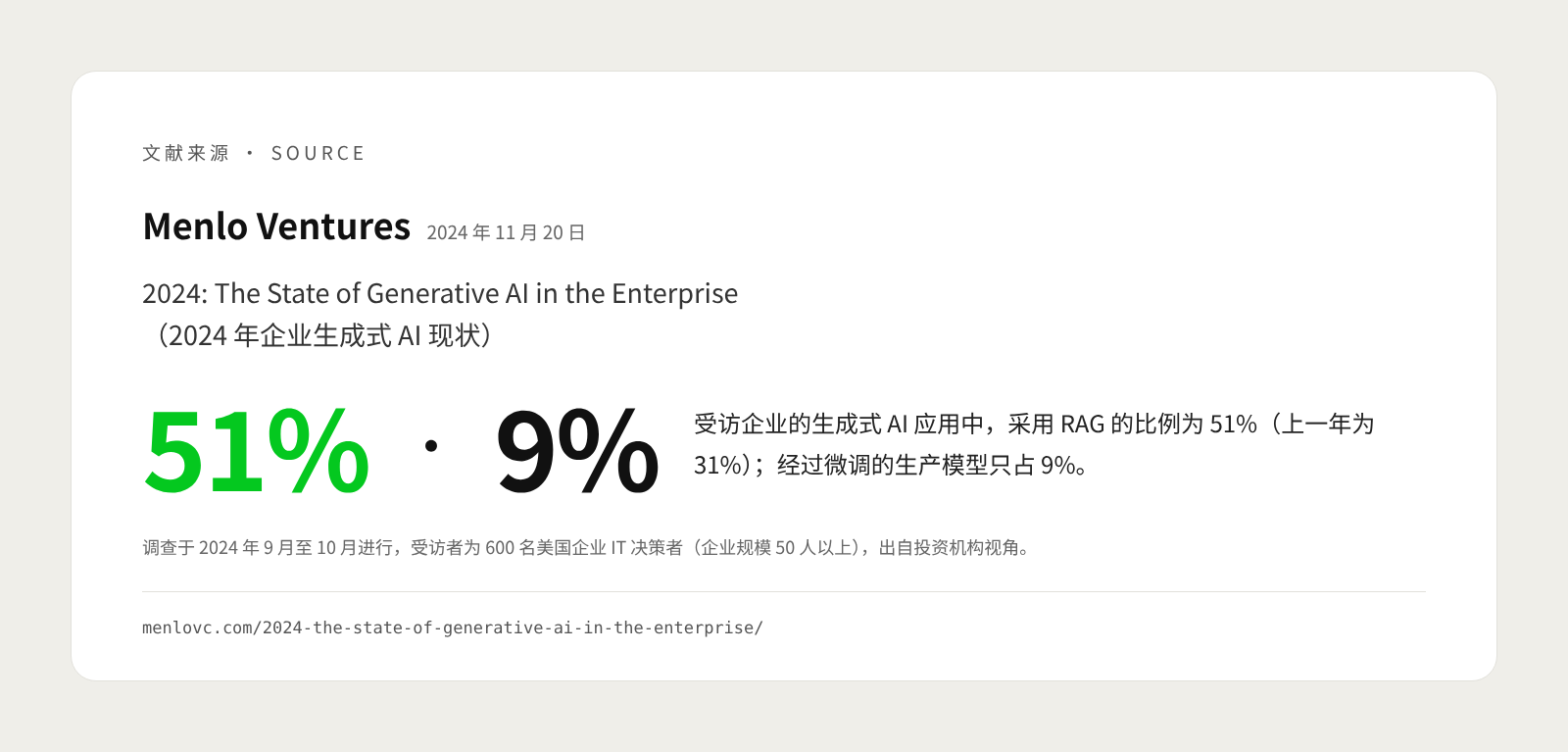
This approach is already widespread in business. Between September and October 2024, investment firm Menlo Ventures surveyed 600 US enterprise IT decision-makers (at companies with 50 or more employees) and found that 51% of the generative AI applications at respondents' companies used RAG, up from 31% the previous year, while fine-tuned production models accounted for only 9% (source). Note that the survey covered only US companies and reflects an investor's perspective.
In business, RAG is most commonly used in four ways:
- Internal policy Q&A. Expense standards, leave procedures, purchasing approval limits and the like. New employees no longer have to keep asking HR and finance, and answers are more consistent.
- Product information lookup. Sales and support staff quickly find specifications, compatible models and pricing policies. For example, a wholesaler's sales rep can look up a replacement model for a SKU while on site with a customer.
- After-sales knowledge base. With troubleshooting manuals, historical tickets and repair records connected, support staff or field engineers can search by symptom for similar cases and fixes.
- Contract search. Legal and procurement teams look up payment terms, liability for breach and renewal clauses, or compare contracts across suppliers. These are higher-risk scenarios, and answers should be reviewed by a person.
What they have in common: large volumes of material, frequent updates, and answers that must be grounded in evidence. This is also a simple test of whether a scenario is a good fit for RAG.
How do RAG, fine-tuning and long context differ?
There are three common ways to give a model access to company information: RAG, fine-tuning and long context. For most “look it up and answer” needs, RAG is the safer starting point; fine-tuning is better suited to teaching a model fixed formats and styles of expression than to feeding it facts.
Fine-tuning means further training a model on the company's own example data; long context means placing an entire document directly in the prompt so the model reads it all in one go. The differences are as follows:
| Criterion | RAG (retrieval-augmented generation) | Fine-tuning | Long context |
|---|---|---|---|
| Basic approach | Retrieves relevant chunks before answering | Retrains the model on example data | Puts the whole document in the prompt at once |
| Best suited to | Large, frequently updated material that needs citations | Fixed formats, tone, industry terminology, classification tasks | Small volumes of material, or one-off analysis of a long document |
| Updating information | Just update the documents and the index | Often requires retraining | Must be supplied again with every call |
| Citing sources | Easy | Very difficult | Possible, but depends on prompt instructions |
| Access control | Can filter by the person asking at retrieval time | Very difficult; knowledge is baked into the model's parameters | Requires manual screening before inclusion |
| Main costs | Preparing material; building and maintaining indexing and retrieval | Data preparation, training and repeated evaluation | Cost and latency of processing large amounts of text on every call |
| Main limitations | If retrieval misses, answers suffer | Still hallucinates; hard to remove a specific piece of knowledge | Too much material won't fit; information in the middle of long texts is easily overlooked |
The comparison reflects the general case; the right trade-off depends on the volume of material and how often it is used.
When the volume of material is modest, long context is a simple option worth considering. In a September 2024 technical article, Anthropic suggested that if a knowledge base is smaller than about 200,000 tokens (a token is the basic unit of text a model processes; this is roughly equivalent to 500 pages), you can simply include the entire content in the prompt without building RAG; only larger knowledge bases need a more scalable solution (source).
But “fitting it in” is not the same as “reading it carefully.” In the paper “Lost in the Middle,” researchers from Stanford University and other institutions found that models perform best when key information sits at the beginning or end of a long input, and noticeably worse when it is in the middle, even for models designed specifically for long contexts (source). In practice, therefore, the three approaches are often combined. For example, you might use RAG to find the contract relevant to a question, then place the entire contract in context to read it clause by clause.
Why do so many enterprise knowledge bases underperform?
When a knowledge base gives poor answers, the problem usually lies not with the model but with the material and how it is managed. RAG only amplifies the quality of the underlying material: if the material is a mess, the answers won't be accurate either.
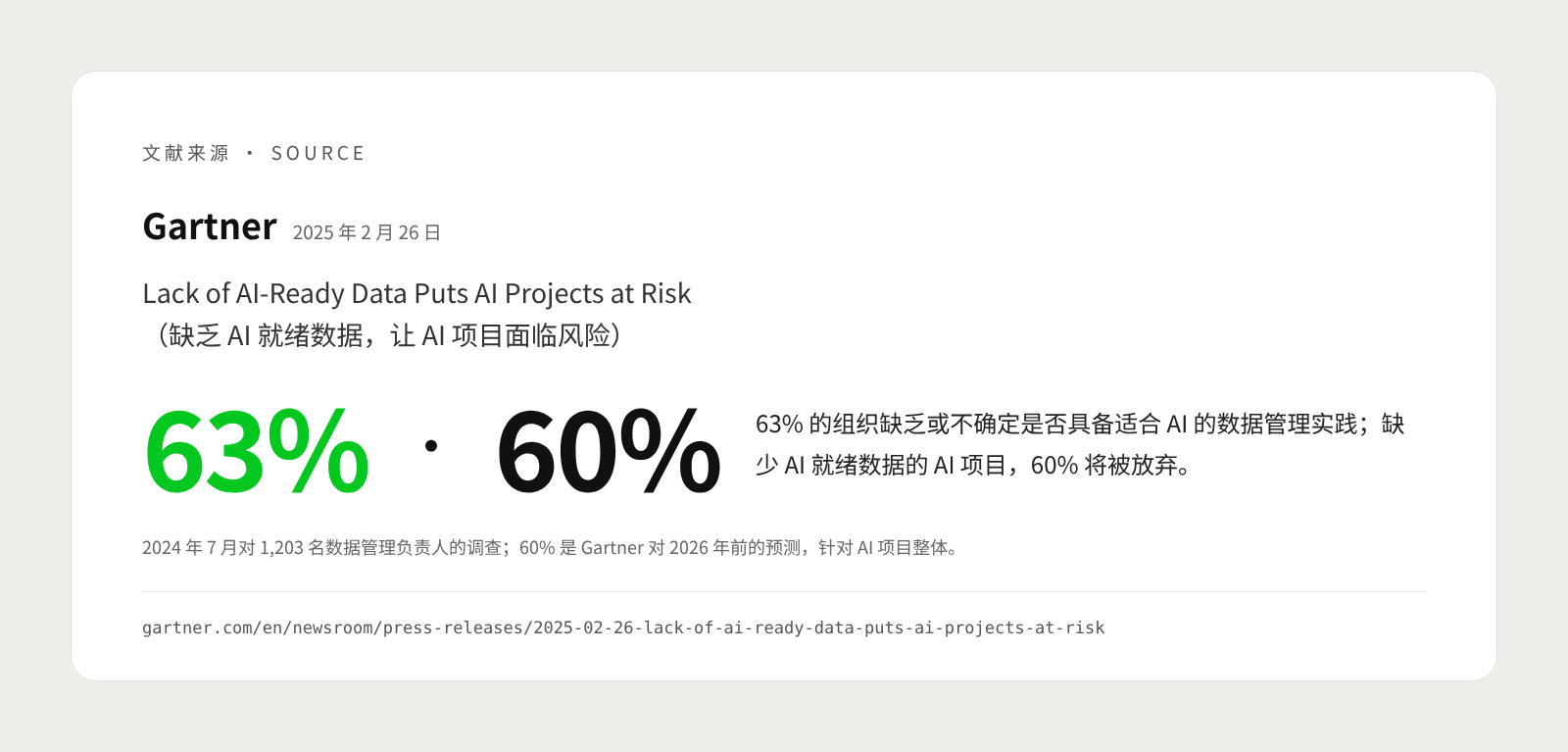
In a July 2024 Gartner survey of 1,203 data management leaders, 63% of organizations said they either do not have, or are unsure whether they have, the right data management practices for AI. On that basis, Gartner predicts that through 2026, 60% of AI projects unsupported by AI-ready data will be abandoned (source). The survey concerns AI projects in general, but the finding applies equally to knowledge bases.
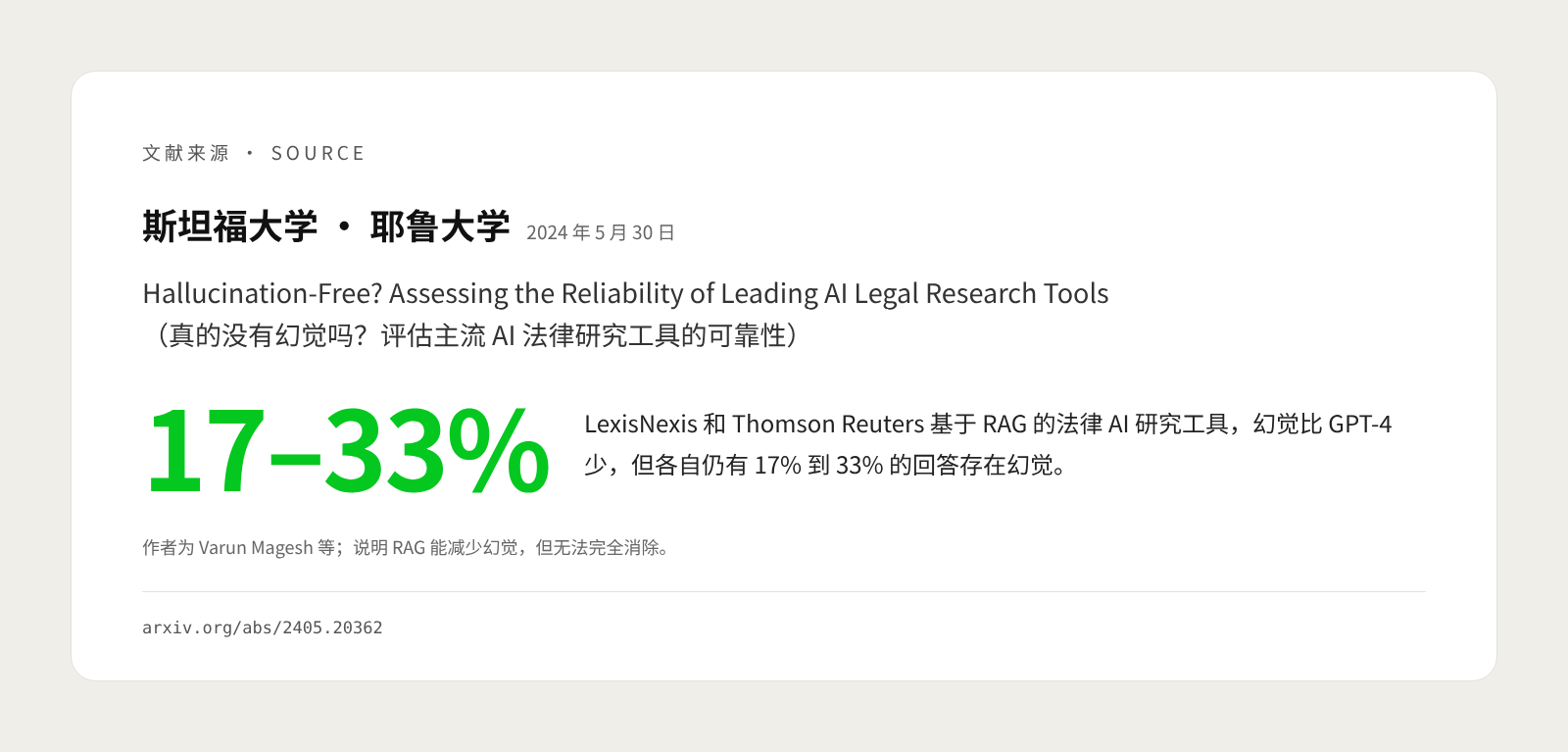
Even in products from specialist vendors, RAG is no cure-all. In 2024, researchers at Stanford University and Yale University evaluated RAG-based legal AI research tools from LexisNexis and Thomson Reuters and found that they hallucinated less than a general-purpose chatbot (GPT-4), but each still hallucinated in 17% to 33% of responses (source).
In enterprise practice, poor results usually come down to five causes:
- Outdated, duplicate and contradictory material. The same policy may exist on the shared drive as “2023 version,” “2024 version” and “Final version (2).” If retrieval finds an old version, the answer will be wrong, and convincingly so.
- Permissions not handled properly. Connecting a knowledge base doesn't mean everyone should be able to ask for the salary table or customer quotes. OWASP's 2025 Top 10 for LLM Applications specifically lists vector and embedding weaknesses: where access controls are weak, a model may retrieve and leak personal information or trade secrets, and where multiple user groups share one vector database, information can leak across groups. It recommends storage that supports fine-grained permissions and partitioning data by access level (source).
- Messy document formats. Scanned PDFs, tables embedded in images, Excel files with merged cells and flowcharts drawn in PowerPoint all easily lose information when chunked.
- Chunking that strips out context. Anthropic gives an example: a chunk reading only “The company's revenue grew by 3% over the previous quarter,” without saying which company or which quarter, is hard to retrieve. In its own tests, it found that adding context to each chunk and combining this with keyword search reduced retrieval failures by 49%, and adding reranking reduced them by 67% (source). These are the vendor's own test results, but they show that retrieval design significantly affects outcomes.
- No evaluation. Without a set of standard questions and reference answers, after changing the chunking method, switching models or adding material, no one can say whether results got better or worse, and judgments rest on scattered user impressions.
How do you build a reliable enterprise knowledge base? A step-by-step guide
When building an enterprise knowledge base, choosing the technology is often the easiest part. Start with a high-frequency scenario with clearly bounded material, clean up the material and define permissions first, and only then turn to the technology.
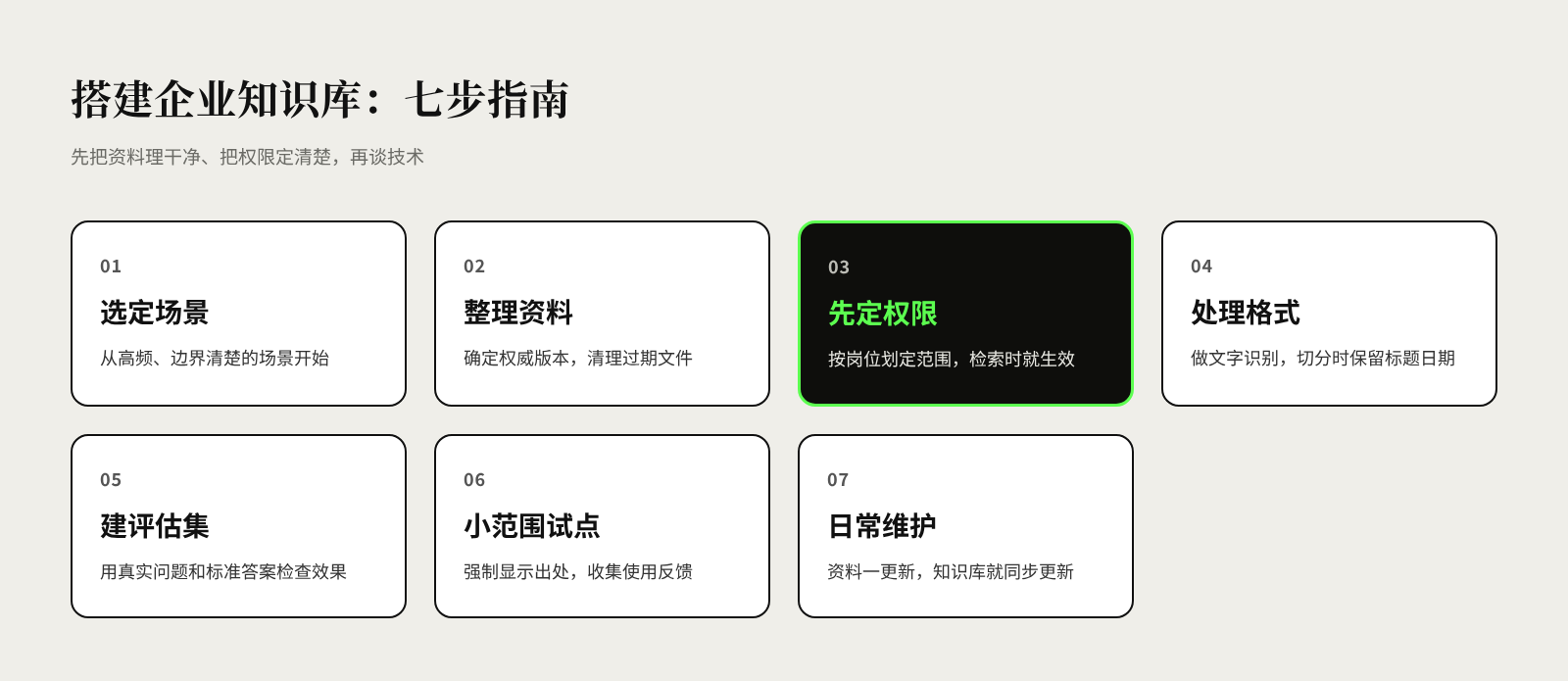
Step 1: Choose a specific scenario and define who will use it. For example, “store staff looking up the returns and exchanges policy” or “customer service checking product warranty terms,” rather than starting with a “company-wide knowledge base.” The more specific the scenario, the clearer the scope of material and the criteria for success.
Step 2: Inventory and organize the material. Identify the authoritative version of each type of material, delete duplicate and outdated files, and assign each document an owner and an update cycle. This step involves the most work, but it sets the ceiling for the knowledge base.
Step 3: Define permission rules first. Set the visibility of material by department, role, store or customer, reusing the permission settings of existing systems wherever possible. Permissions should take effect at the retrieval stage: the system retrieves only material the person asking is authorized to see, rather than retrieving everything and then telling the model “don't mention it.”
Step 4: Process formats and chunk sensibly. Run OCR on scanned documents and convert important tables into structured formats; when chunking, keep the file name, section heading, effective date and similar information with each chunk so it doesn't lose its context.
Step 5: Build an evaluation question set. Collect real questions from frontline staff and write reference answers with their sources. After every change, check against the same set: was the right material found, is the answer correct, is the source accurate, and when the material doesn't contain the answer, does the system honestly respond “not found”?
Step 6: Pilot on a small scale and always show sources. Start with one team or a few stores, display the source for every answer, and provide “helpful / not helpful” feedback buttons. Regularly review questions that went unanswered or were answered incorrectly, and add or correct material accordingly.
Step 7: Make maintenance part of daily operations. Whenever policies or product information are updated, the knowledge base must be updated too. Gartner also stresses that AI-ready data is not a “one-and-done” exercise (source). You can add “sync the knowledge base” to the checklists for publishing policies and launching new products.
Frequently asked questions about enterprise knowledge bases and RAG
Is it safe to hand company information to AI? It depends on the deployment model and the vendor's terms. When selecting a solution, confirm at least four things: where the data is stored, whether it will be used to train models, how long it is retained, and who can access it. For highly sensitive material, consider a private (on-premises) deployment, or set out clearly in the contract how the data may be used.
Could employees see material they shouldn't through the knowledge base? Without access controls, yes. The right approach is to filter by the asker's permissions at retrieval time and pass the model only the chunks they are authorized to see. You cannot rely on the model to decide for itself who should see what.
Do we have to build it ourselves? Not necessarily. Many office suites and customer service systems already include built-in knowledge base Q&A. When the volume of material is modest and the scenario is standard, you can validate results with an off-the-shelf product first; consider customizing or building your own when you need to connect multiple internal systems, have complex permissions or require private deployment. Either way, there is no skipping material preparation and evaluation.
Once we use RAG, will AI stop making things up? No. RAG significantly reduces hallucinations but cannot eliminate them entirely, as the legal tools evaluation mentioned above shows. Require every answer to include a source, and keep human review in place for high-risk questions such as contracts and finance.
References
- Retrieval-Augmented Generation for Knowledge-Intensive NLP Tasks, Patrick Lewis et al. (Facebook AI Research, University College London, New York University), NeurIPS 2020, May 2020
- Why language models hallucinate, OpenAI, September 2025
- 2024: The State of Generative AI in the Enterprise, Menlo Ventures, November 2024
- Introducing Contextual Retrieval, Anthropic, September 2024
- Lost in the Middle: How Language Models Use Long Contexts, Nelson F. Liu et al., Transactions of the Association for Computational Linguistics, July 2023
- Lack of AI-Ready Data Puts AI Projects at Risk, Gartner, February 2025
- Hallucination-Free? Assessing the Reliability of Leading AI Legal Research Tools, Varun Magesh et al. (Stanford University, Yale University), May 2024
- LLM08:2025 Vector and Embedding Weaknesses, OWASP, 2025